

ワークスペースを整理する
オーディエンス、素材、調査を、それぞれ適切なワークスペースとプロジェクトで管理します。
ワークスペースには、オーディエンス、調査タスク、素材、共通の設定がまとまっています。プロジェクトは、そのワークスペースの中で作業を整理するための単位です。
まずワークスペースを選ぶ
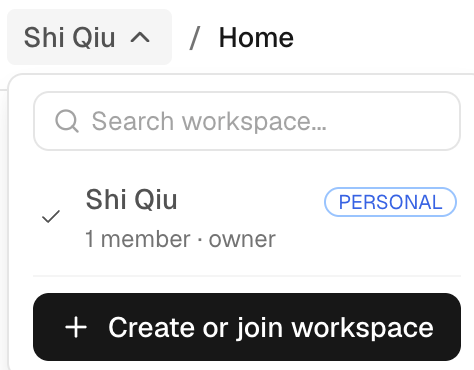
リソースを作成したり探したりする前に、ワークスペースの切り替えメニューで対象のワークスペースを選びます。保存したはずのオーディエンス、調査票、レポートが見当たらないときは、同じものを作り直す前に、開いているワークスペースが正しいかを確認してください。
サイドバーは、New Task、Audience、Library(ライブラリ)、Usage に分かれています。プロジェクトや最近のタスクから、作業の続きに戻れます。プロジェクトの中で新しいタスクを始めると、そのプロジェクトに紐づいた状態でタスクの入力欄が開きます。
ワークスペースを作成する・参加する
ワークスペースを作成するには、ワークスペースの切り替えメニューで Create or join workspace を選び、ワークスペース名と URL を設定します。既存のワークスペースに参加するには、招待を承諾するか、そのワークスペースのオーナーから案内された参加手順に従います。オーディエンスを作成したり調査を実行したりする前に、選択中のワークスペースを確認してください。
ワークスペースには個人と組織の 2 種類があります。個人ワークスペースはあなた専用で、メンバーを招待できません。登録時に Personal を選ぶと作成されます。組織ワークスペースは他の人と共同で作業するためのもので、オーナーと管理者がメンバーを招待し、ブランディング、シングルサインオン、公開リンクのルールを管理します。ワークスペースの切り替えメニューから新しく作成するワークスペースは、すべて組織ワークスペースになります。
組織は Settings › Single sign-on で、認証済みのメールドメインを検出可能(Discoverable)にすることもできます。そのドメインのメールアドレスで登録した人には組織が表示され、参加をリクエストできます。リクエストはオーナーまたは管理者が一件ずつ承認します。この設定は、オーナーまたは管理者がオンにするまでオフのままです。
組織は Settings › Single sign-on で自社の ID プロバイダーを接続し(シングルサインオン、SAML 2.0)、メンバーが会社のアカウントでサインインできるようにすることもできます。Microsoft Entra ID、Okta、Google Workspace、HENNGE One、Lark / Feishu、Microsoft AD FS、PingOne、PingFederate、OneLogin、JumpCloud、Alibaba Cloud IDaaS、Authing のほか、SAML 2.0 に対応したあらゆる ID プロバイダーを利用できます。まずメールドメインを認証し、Set up を選びます。プロバイダーごとのステップガイドに沿って、SAML アプリを作成して iMario に表示される 2 つの値を入力し(プロバイダーの管理画面での呼び方で表示されます)、プロバイダーのメタデータ URL、メタデータファイル、またはサインイン情報を iMario に登録して、自分のアカウントでテストサインインします。テストに成功すると、認証済みドメインの全員にシングルサインオンを必須にできます。ID プロバイダーの障害に備えて、オーナーは通常のサインイン方法を引き続き使えます。ID プロバイダー経由で初めてサインインした人は、既定では参加をリクエストし、オーナーまたは管理者が承認します。代わりに、Viewer または Editor としてすぐに参加させることもできます。招待された人は常にそのまま参加できます。
意思決定を軸に整理する
タスクやプロジェクトには、調査の目的、クライアント、実施サイクルがわかる名前を付けます。あとで並べて確認したり、まとめて1つのレポートにしたりするつもりなら、関連する実行は同じタスクの会話に入れておきましょう。
プロジェクトは、関連するタスクや素材をまとめておく入れ物です。プロジェクトに入れても調査方法は変わりません。また、ワークスペースで有効になっていない外部連携が使えるようになることもありません。
メンバーと設定
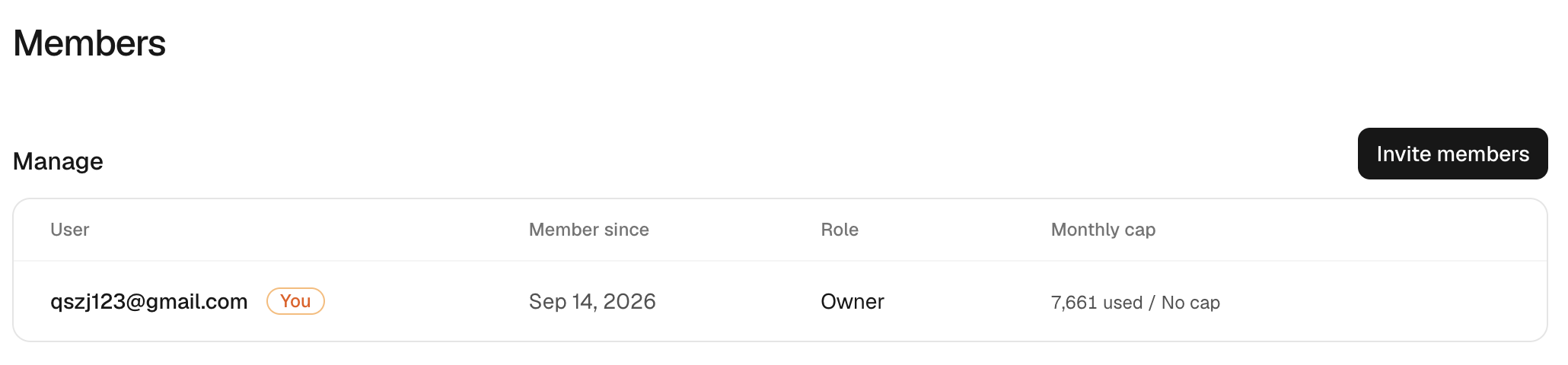
利用できる共同作業の設定は、ワークスペースの設定画面にまとまっています。編集できるのはオーナーと管理者ですが、一部の操作はオーナーしか実行できません。また、リソースを閲覧できるからといって、設定を変更したりツールの操作を承認したりできるとは限りません。
| ロール | 主な権限 |
|---|---|
| Owner(オーナー) | ワークスペース、請求、メンバー、アクセス権、削除の各設定を管理できます。 |
| Admin(管理者) | オーナーが許可した範囲で、メンバーを管理し、共通設定を変更できます。 |
| Editor(編集者) | ワークスペースの設定と、割り当てられたアクセス権で許された範囲のリソースを使えます。 |
| Viewer(閲覧者) | 許可されたリソースを確認できますが、共通設定は変更できません。 |
ワークスペースの設定によっては、1人あたりの利用量やクレジットに上限が設けられていることもあります。大規模な調査を割り振る前に、現在の上限を確認してください。メンバーや API キーを追加しても、ワークスペースの予算が自動で増えるわけではありません。
請求を共有している場合は、ワークスペースに設定されたウォレットと取引の内容を確認します。利用状況を見れば、どの作業でクレジットが使われたかを見分けられます。
ワークスペースの外に共有する
調査の知見を外部に配布するときは、共有とエクスポートの手順に従います。レポートの公開リンクを渡しても、相手がワークスペースのメンバーになるわけではありません。必要に応じてリンクを無効にしてください。ただし、エクスポートしたファイルは受け取った相手の手元に残ります。