

iMario MCP サーバーに接続する
接続を承認するかワークスペースの API キーを発行し、クライアントを設定して、調査を実行する前にアクセスを確認します。
始める前に
サーバーのアドレスは https://mcp.imario.ai/mcp です。Settings > MCP & API にも、コピーボタン付きで表示されています。
クライアントは Streamable HTTP に対応している必要があります。認証方法は2つあり、どちらを使うかはアカウントではなくクライアントによって決まります。
- 接続を承認する:ChatGPT、Claude の各アプリ、Claude Code、Codex、Cursor、VS Code では、iMario の画面が開きます。サインインしてワークスペースを選び、承認します。何かをコピーする必要はありません。
- API キーを使う:定期実行のジョブ、CI、自作のエージェントなど、ブラウザを開けないコードでは、Settings > MCP & API にあるワークスペースの API キーを使います。
どちらの方法でも、接続は作成した本人の名義で、1つのワークスペースの中だけで動作します。その人のワークスペースでのメンバー資格とロールも、そのまま適用されます。接続が取り消された場合や、作成者がワークスペースから外れた場合は、認証が通らなくなります。閲覧者(Viewer)は読み取りはできても、調査は実行できません。
どちらの方法にも、個別の予算はありません。連携中のアプリが使えるクレジットの上限は、ワークスペース全体で1日あたり1つだけです。この上限は Settings > MCP & API の Daily limit で設定します。連携中の各アプリと API キーには、それぞれ過去30日間の消費量が表示されます。
Claude Code、Codex、Cursor では、セットアップ全体をエージェントに任せられます。Connect iMario to this agent: imario.ai/SKILL.md を貼り付けると、エージェントが手順2のコマンドを実行し、コンパニオンスキルもインストールします。手順1a の承認だけは、ご自身で操作します。
1a. 接続を承認する(ChatGPT、Claude、Claude Code、Codex、VS Code)
- アプリでコネクターを追加し、上記のエンドポイントを指定します。Claude Code または Codex の場合は、手順2のコマンドを実行します。
- アプリが認可先を見つけ、iMario に自身の情報を伝えます。伝え方は、クライアントとして登録するか、自身のクライアントメタデータドキュメントの場所を示すかのどちらかです。続いて iMario の画面に移動します。
- サインインしていない場合はサインインし、このアプリにアクセスを許可するワークスペースを選んで Approve を選択します。
- アプリの画面に戻ると、接続が完了しています。
2つのチャットアプリでは、次の場所からコネクターを追加します。
| アプリ | 操作 |
|---|---|
| ChatGPT | Settings > Security and login で Developer mode をオンにします。次に Settings > Plugins で + を選択し、名前を iMario とし、サーバー URL に https://mcp.imario.ai/mcp を入力して Create を選択します。ブラウザで接続の承認を求められたら、承認します。 |
| claude.ai と Claude デスクトップアプリ | Customize > Connectors で + を選択し、Add custom connector を選んで https://mcp.imario.ai/mcp を入力し、Add を選択します。Team プランと Enterprise プランでは、まず組織のオーナーが Organization settings > Connectors > Add > Custom > Web から追加し、そのあと各メンバーが Customize > Connectors で Connect を選択します。チャットで使うときは、+ > Connectors からオンにします。 |
この2つのアプリに Connect iMario to this agent: imario.ai/SKILL.md を貼り付けても、コネクターは追加されません。どちらのアプリも、ページを読んで答えるだけで、その内容に沿った操作はしないからです。この1行は Claude Code、Codex、Cursor 向けです。Streamable HTTP に対応した一般的な MCP クライアントでは、後述のエンドポイントと API キーを使う方法で接続できます。ブラウザでの認可に対応しているクライアントなら、そのクライアント独自の OAuth 承認画面も使えます。
接続は Settings > MCP & API に、アプリの名前で表示されます。接続を解除するには、そこにあるゴミ箱アイコンを選択します。解除すると、アプリは次のリクエストの時点でワークスペースにアクセスできなくなり、再び使うにはもう一度承認が必要です。
1b. API キーを発行する
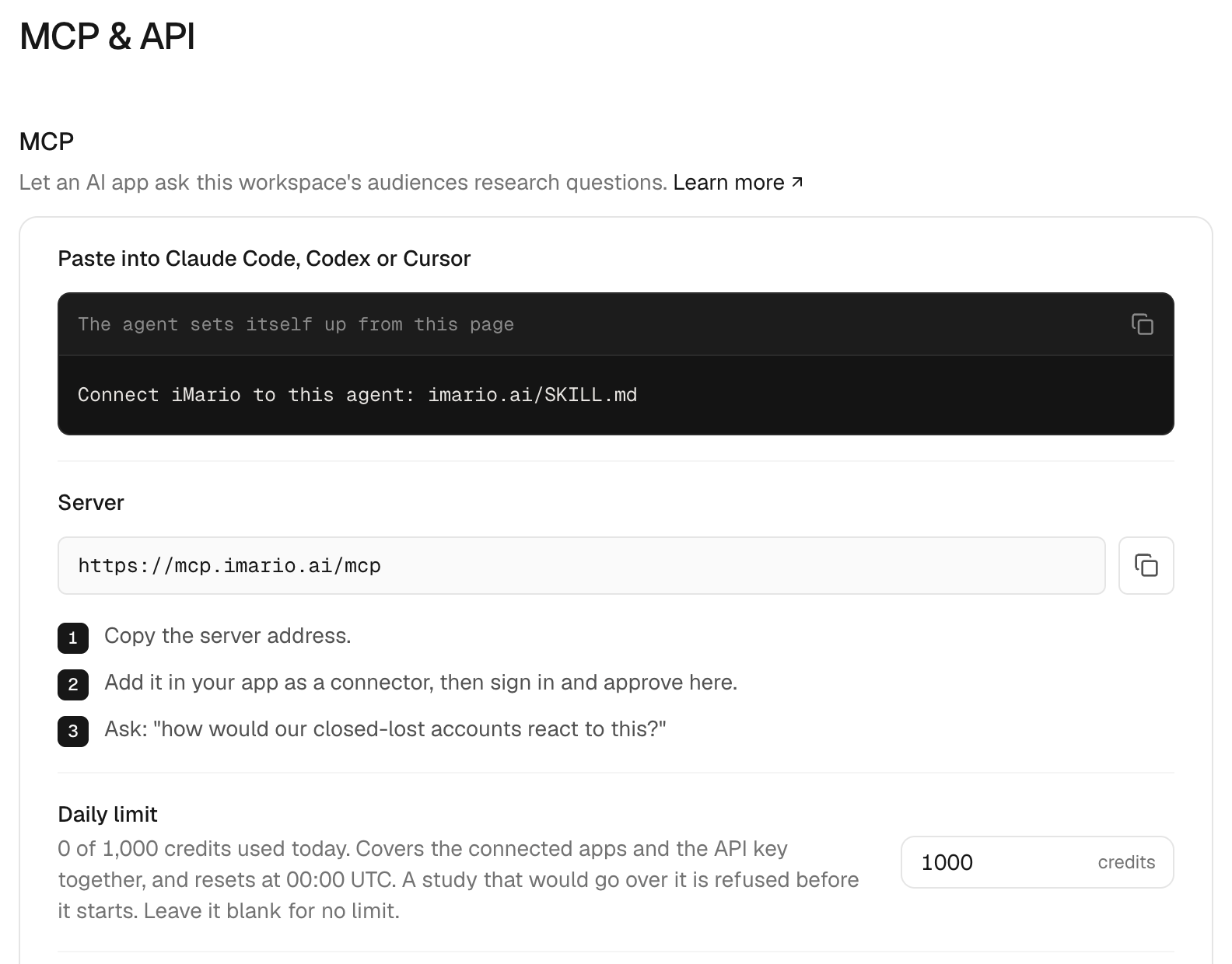
- ワークスペースを開き、Settings > MCP & API に移動します。
- オーナーまたは管理者の権限で、API keys の Generate key を選択します。
- 画面にキーが出ているうちにコピーします。キーの全体が表示されるのはこの1回だけで、以降は先頭の数文字しか表示されません。
API キーはワークスペースごとに1つです。Regenerate を選ぶとキーが置き換わります。古いキーは次のリクエストの時点で使えなくなり、新しいキーはすぐに使えます。古いキーを使っていた箇所は、すべて新しいキーに差し替えてください。
キーは、クライアントのローカル設定か認証情報ストアに保存します。実際のキーを、リポジトリにコミットするプロジェクトファイルやチャットのメッセージに書かないでください。
2. クライアントを設定する
Claude Code
claude mcp add --transport http imario YOUR_MCP_ENDPOINT続いて Claude Code で /mcp を実行し、imario を選んで Authenticate を選択します。ブラウザが開き、手順1a の承認ページが表示されます。設定のスコープや削除の方法は、Claude Code の MCP ドキュメントを参照してください。
Codex
codex mcp add imario --url YOUR_MCP_ENDPOINT
codex mcp login imario
2つ目のコマンドを実行すると、ブラウザで承認ページが開きます。詳しくは Codex の MCP ドキュメントを参照してください。
claude mcp add と codex mcp add は、どちらもリモートサーバーを登録するコマンドで、iMario のプロセスをローカルにインストールするわけではありません。ChatGPT や claude.ai のように、アプリ自身の設定画面で接続するアプリでは、この設定は必要ありません。手順1a だけでセットアップは完了です。
VS Code
お使いの VS Code に用意されている、MCP サーバーの設定画面を使います。imario という名前でサーバーを追加して Streamable HTTP のエンドポイントを指定し、ブラウザでの承認フローがあればそれを選びます。代わりにキーを求められた場合は Authorization: Bearer YOUR_IMARIO_KEY を使い、キーはクライアントの認証情報ストアに保管してください。
その他の MCP クライアント
一般的な MCP クライアントでは、https://mcp.imario.ai/mcp を imario という名前の Streamable HTTP サーバーとして追加します。OAuth による承認が使える場合はそれを済ませ、使えない場合はワークスペースの API キーを Authorization ヘッダーに設定します。そのうえで、見積もりや調査の実行に進む前に、ツールとオーディエンスの一覧を取得します。
API キーを使う場合
imario という名前でサーバーを設定し、接続先のデプロイメントの URL を指定します。Streamable HTTP を選択し、Authorization: Bearer YOUR_IMARIO_KEY を追加します。X-Imario-Key ヘッダーでも認証できます。設定ファイルのスキーマはクライアントごとに異なります。あるクライアントの JSON を、そのまま別のクライアントの設定にコピーしないでください。
サインインせずに使いたい場合は、Claude Code でもキーを使えます。
claude mcp add --transport http imario YOUR_MCP_ENDPOINT --header "Authorization: Bearer YOUR_IMARIO_KEY"手持ちの画像や調査票を送る
クリエイティブテストでは、回答者に実際の画像を見せます。iMario はまず、アプリから渡された添付ファイルを使います。添付ファイルが渡されず、アシスタントがファイルを読み取れる場合は、自動アップロードに切り替えます。画像を選び直す必要があるのは、どちらの方法も使えない場合か、自動アップロードに失敗した場合だけです。
| 利用環境 | 動作 |
|---|---|
| ファイル入力に対応した ChatGPT | アプリが添付ファイルを iMario に渡します。ファイルを選び直す必要はありません。 |
| Codex、Claude Code など、ファイルとネットワークにアクセスできるクライアント | 読み取れる添付ファイルを、アシスタントが自動でアップロードします。手動アップロード用のカードは開きません。 |
| 自動転送に対応していないクライアント、またはアップロードに失敗した場合 | アシスタントが iMario のカードを表示できます。画像を選んで Upload image を選択します。カードに調査も含まれている場合は Start study を選択します。 |
| カードを表示できないクライアント | アシスタントが、ブラウザで画像をアップロードするための1回限りのリンクを渡せます。 |
アップロード用のリンクを作成したり、調査の料金を計算したりしても、それで画像が届いたことにはなりません。アシスタントがアップロードの完了を伝えてよいのは、iMario が画像の受け取りを報告したあとだけです。カードで画像をアップロードしたあとに調査を開始できなかった場合は、カードから再試行すると、アップロード済みの画像がそのまま使われます。
claude.ai では、コード実行環境から iMario へのアクセスが許可されていれば、アシスタントがその環境から画像をアップロードすることもできます。許可するには、Settings > Capabilities > Code execution and file creation > Additional allowed domains に iMario の API ホストを追加します。Team プランまたは Enterprise プランでは、管理者が追加する必要があります。アップロードした画像はライブラリに保存されます。
調査票やインタビューガイドは、アップロードする必要がありません。資料をアシスタントに渡して実施を頼むと、アシスタントが設問を書き写し、iMario がそれをアンケートまたはインタビューガイドとしてライブラリに保存します。設問文と選択肢は引き継がれますが、スキップロジック、マトリクス設問、設問内の画像は引き継がれません。その点は、アシスタントから説明があるはずです。
アイデアのラフスケッチは、画像の代わりに説明文としてテストできます。その場合は、回答者が画像そのものではなく説明文に反応したことが、結果に明記されます。
3. 調査を始めずに確認する
クライアントを再接続し、サーバーとツールの一覧を確認します。サーバーが公開しているツールは、list_audiences、create_audience、get_audience、estimate_study、run_study、get_study、request_upload(自動アップロードの準備)、request_manual_upload(手動アップロードによる代替手段)です。
エージェントに「アクセスできる iMario のオーディエンスを一覧で見せてください。オーディエンスの作成や調査の実行はしないでください」と頼みます。返ってきたオーディエンスの定義が、意図したワークスペースのものかを確認します。
次に、その一覧にあるオーディエンス ID を使って見積もりを依頼します。実行を承認する前に、費用、利用可能な残高、受け付けられなかったオーディエンス、予算の上限を確認してください。接続に成功しただけでは、調査にクレジットを使うことを認めたことにはなりません。
4. 実行して結果に戻る
実行することにしたら、エージェントが run_study を呼び出し、run_id、study_id、web_url を受け取ります。同じ送信を再試行するときは、同じ冪等キーを再利用します。進捗は get_study で取得します。短い間隔でポーリングを繰り返さないでください。
結果を解釈する前に、outcome を確認します。partial_answers の場合は、実際に回答が完了した人数とセットで扱う必要があります。no_answers は「0%」という結果ではありません。調査の内容は web_url を開いて確認します。レポートの作成と、特定の選択肢を選んだ回答者だけに絞った追加質問は、Web 画面で操作します。
トラブルシューティングとアクセスの取り消し
| 症状 | 対処 |
|---|---|
| エンドポイントが見つからない | サーバーのアドレスに入力ミスがないか、セルフホストのデプロイメントで /mcp が公開されているかを確認します。 |
| HTTP 401 | 接続を承認し直すか(Claude Code では /mcp > Authenticate)、キーが正しいか、取り消されていないか、キーの持ち主がまだワークスペースのメンバーかを確認します。 |
| HTTP 429 | そのキーを使うすべての呼び出しの頻度を下げます。キーのレート制限は、ポーリングとツールの呼び出しを合わせて数えます。 |
audience_rejected | 理由を確認します。断りなく別のオーディエンスに置き換えないでください。 |
daily_budget_exceeded | 調査の規模を小さくするか、UTC の 00:00 まで待つか、オーナーまたは管理者に Settings > MCP & API で1日あたりの上限を引き上げてもらいます。 |
insufficient_credits | ワークスペースのウォレットを確認します。新しいキーを発行しても、クレジットは増えません。 |
| ツールは表示されるが、スキルが見当たらない | コンパニオンスキルを別途インストールします。 |
API キーをローテーションするには、Settings > MCP & API で Regenerate を選択します。古いキーは次のリクエストの時点で使えなくなります。アプリのアクセスを止めるには、Connected apps でそのアプリの横にあるゴミ箱アイコンを選択します。そのアプリのサインインは次のリクエストから無効になり、再び使うにはもう一度承認が必要です。どちらの操作でも、送信済みの調査はキャンセルされません。アプリ側でサーバーを削除しても、iMario 側の接続は解除されません。