

From Results to Decisions
Read research results, explore their evidence, and decide whether to generate a report.
このページの翻訳はまだありません。英語の原文を表示しています。
A completed research run produces a result in the conversation. You can inspect it before requesting a narrative report.
Read in this order
- Question and stimulus: confirm what participants answered or saw.
- Audience and count: confirm whose responses are included.
- Distribution or themes: read the main pattern and the disagreement.
- Individual answers: check the evidence behind the summary.
- Warnings and limits: note missing material, partial results or limited evidence.
The result's shape follows the method. A closed question shows choices; an open question shows responses and coded themes, led by the values people named when the question asked for one; a focus group includes a discussion. Do not expect the old Quick Test GO/REVISE/KILL scorecard on every current result.
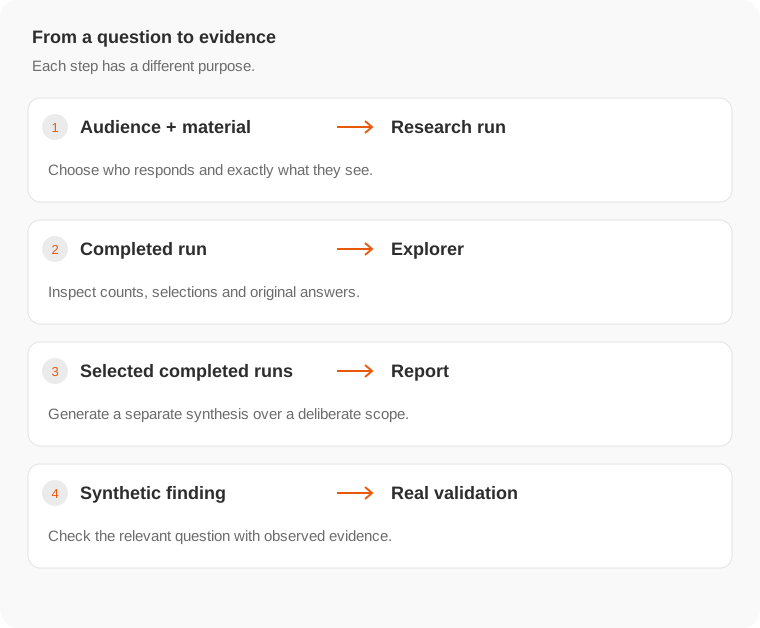
Explore before summarizing
Open Explorer to select responses, inspect subgroups and use breakdowns. A pooled result can hide opposing patterns across audiences.
Ask for an explanation of existing evidence when a finding is unclear. Ask a new research question when the evidence does not answer it. Follow-up research has a new scope and may incur another charge.
Create a report when needed
Use report generation to synthesize completed runs in the conversation. Choose the included runs deliberately. A report is a separate output with its own price, not a prerequisite for viewing research results.
Before sharing, keep the audience definition, question wording and synthetic nature of the responses with the finding. See Share and export and Evidence.