

Organize Your Workspace
Keep audiences, materials and research in the right workspace and project.
A workspace contains audiences, research tasks, materials and shared settings. A project organizes work within that space.
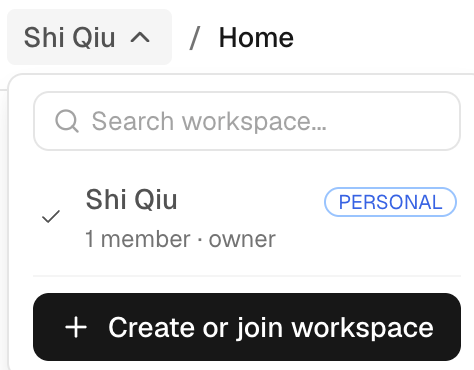
Choose the workspace first
Use the workspace selector before creating or looking for a resource. If a saved audience, questionnaire or report appears missing, confirm the workspace before creating another copy.
The sidebar separates New Task, Audience, Library and Usage. Projects and recent tasks help you return to work. Starting a new task inside a project opens the task composer with that project context.
Create or join a workspace
To create a workspace, use the workspace selector and choose Create or join workspace, then set its name and URL. To join one, accept the invitation or use the workspace join flow provided by its owner. Confirm the active workspace before creating audiences or running research.
A workspace is either personal or an organization. A personal workspace is just for you and has no members; it is the one made at sign-up when you choose Personal. An organization is for working with others: owners and admins invite people and manage branding, single sign-on and the rules for public links. Every workspace you create from the workspace selector is an organization.
An organization can also make a verified email domain discoverable in Settings › Single sign-on. People who sign up with an email at that domain then see the organization and can ask to join; an owner or admin approves each request. Discoverable is off until an owner or admin turns it on.
An organization can also sign its people in through its own identity provider (single sign-on, SAML 2.0) in Settings › Single sign-on. Microsoft Entra ID, Okta, Google Workspace, Lark / Feishu, Microsoft AD FS, PingOne, PingFederate, OneLogin, JumpCloud, HENNGE One, Alibaba Cloud IDaaS, Authing and any other SAML 2.0 provider work. Verify your email domain first, then choose Set up: a step-by-step guide for your provider walks you through creating a SAML app with the two values iMario shows (named the way your provider names them), giving iMario the provider's metadata URL, its metadata file or its sign-in details, and testing sign-in as yourself. Once the test passes, you can require single sign-on for everyone at your verified domains. Owners keep their usual sign-in, in case the identity provider is down. Someone new your identity provider signs in asks to join, and an owner or admin approves; you can let new people straight in as viewers or editors instead. Invited people always come straight in.
Organize around the decision
Give tasks and projects names that identify the research goal, client or cycle. Keep related runs in the same task conversation when you intend to inspect them together or create a report over them.
A project is an organizational container for related tasks and materials. It does not change the research method or grant access to integrations that are not enabled for the workspace.
Members and settings
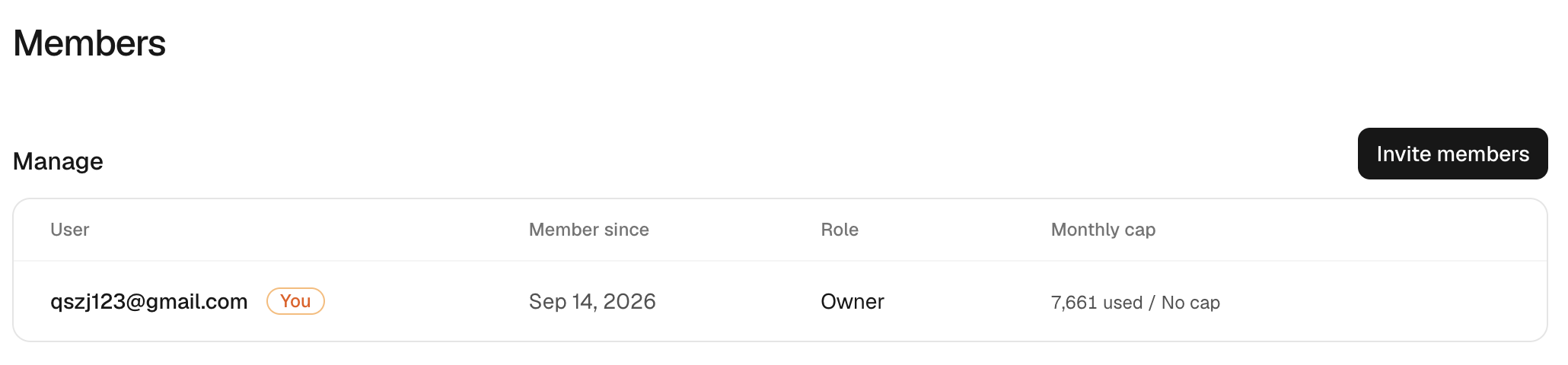
Use workspace settings to manage the available collaboration controls. Owners and admins can edit workspace settings; some owner-level actions remain restricted to the owner. Being able to view a resource does not necessarily allow changing settings or approving a tool action.
| Role | Typical access |
|---|---|
| Owner | Manage the workspace, billing, members, access and deletion controls. |
| Admin | Manage members and shared settings allowed by the owner. |
| Editor | Use the workspace resources allowed by its settings and assigned access. |
| Viewer | Inspect permitted resources without changing shared configuration. |
Workspace settings may also impose a per-person usage or credit limit. Check the current limit before assigning a large run; a new member or a new API key does not automatically increase the workspace budget.
For shared billing, check the workspace's configured wallet and transaction context. Usage helps distinguish charges from different work.
Sharing beyond the workspace
Use Share and export when distributing findings externally. A public report link is different from workspace membership. Revoke a link when appropriate, and remember that exported files remain with their recipients.