

Run a Survey
Build or import a questionnaire, review its questions, and run it with a chosen audience.
Use a survey for several structured questions answered by a defined audience. You create the questionnaire once in the Library, then attach it to a task each time you run it.
Before you start
- Choose the audience the questions are for. See Choose an audience.
- Have your questions ready as a file (PDF, Word, Excel, CSV or text), or plan to type them in the builder.
- Running a survey uses credits. The estimate is shown before you run; see Pricing & credits.
Try it: create, run and read a survey
The walkthrough below follows one real survey from the Library to its results. Click the highlighted control in each step, or use Next.
The steps in this walkthrough are also written out as numbered steps on this page.
Create the questionnaire
- In the sidebar, click Library, click New, then click Survey. The Survey builder opens with AUDIENCES and QUESTIONS.
- Under AUDIENCES, click Select target audience and choose the audience (here China Gen Z Tea Drinkers). AUDIENCES lists the audience and shows 1 / 3 selected.
- Under QUESTIONS, click Import. An upload area appears. It accepts PDF, Word, Excel, CSV and text files.
- Click the upload area and choose your questionnaire file. The questions are imported into the list (here Q1 to Q9).
- Open each question to check its type and options. Set Multi select where respondents may choose several answers (here Q8), then click Finish. The survey is saved to the Library as a card (here Survey · 9).
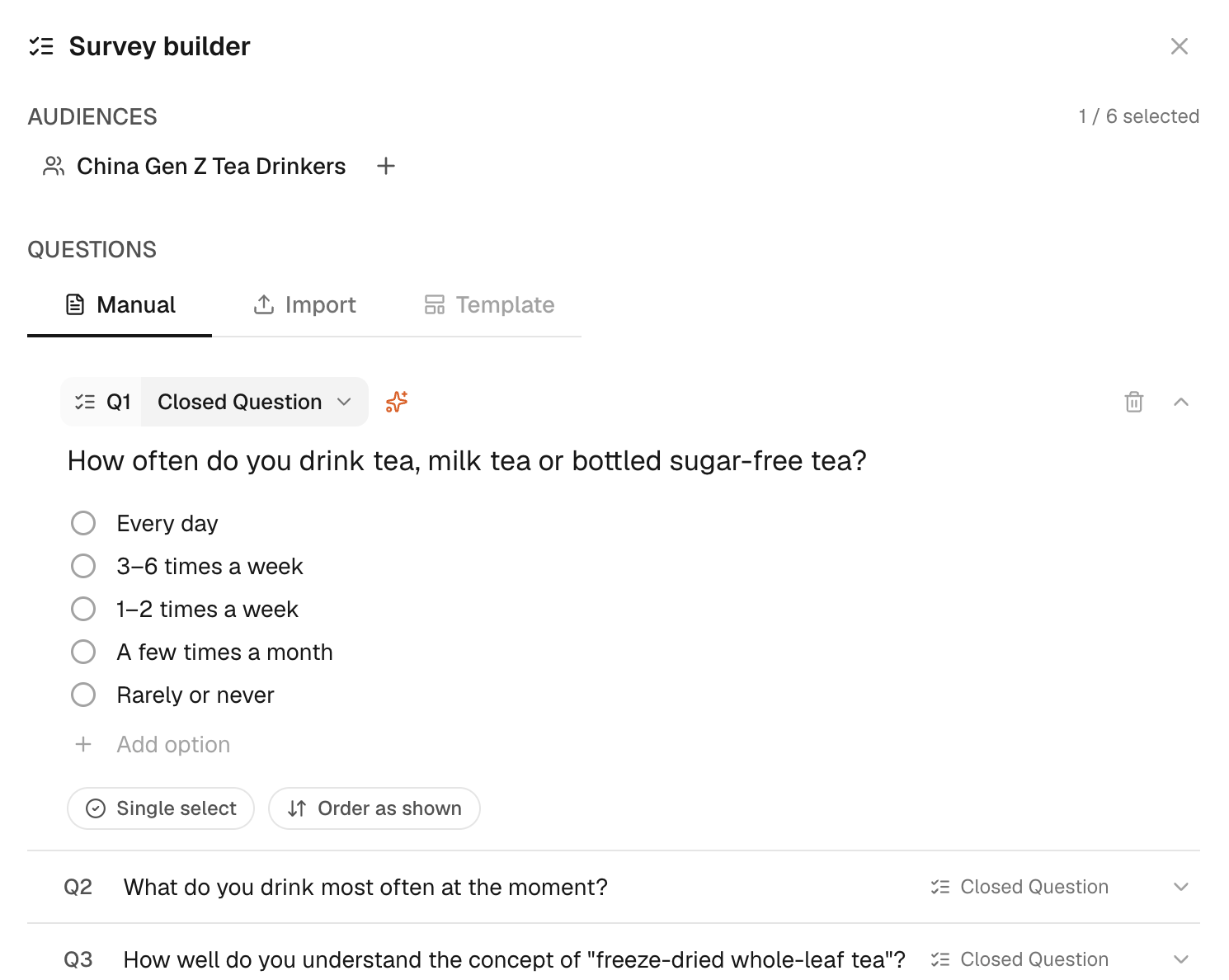
Confirm that the questionnaire is the version you intend to run. You can also type questions under Manual, or create and edit them in the Questionnaire Builder. Split a long questionnaire when separate sections answer different decisions, so that the scope and cost stay clear.
Attach the survey and run it
- In the sidebar, click New Task. A new task opens with the composer.
- In the composer, click + (Add content). The list of methods opens.
- Click Survey (“Several structured questions”). A survey goal appears in the composer, with Attach a survey below it.
- Under Attach a survey, click your survey (here “Freeze-dried tea product concept evaluation”). The survey is attached, and the audience chip shows the survey’s audience.
- Replace the placeholders in the goal with your audience and topic, then click the respondent count (400 respondents). A field for the number of respondents opens.
- Type the number of respondents (here 50). The respondent count and the credit estimate update.
- Check the respondent count and the credit estimate, then click Run (the arrow button). The task starts. The survey card shows the objective, the audience and the progress.
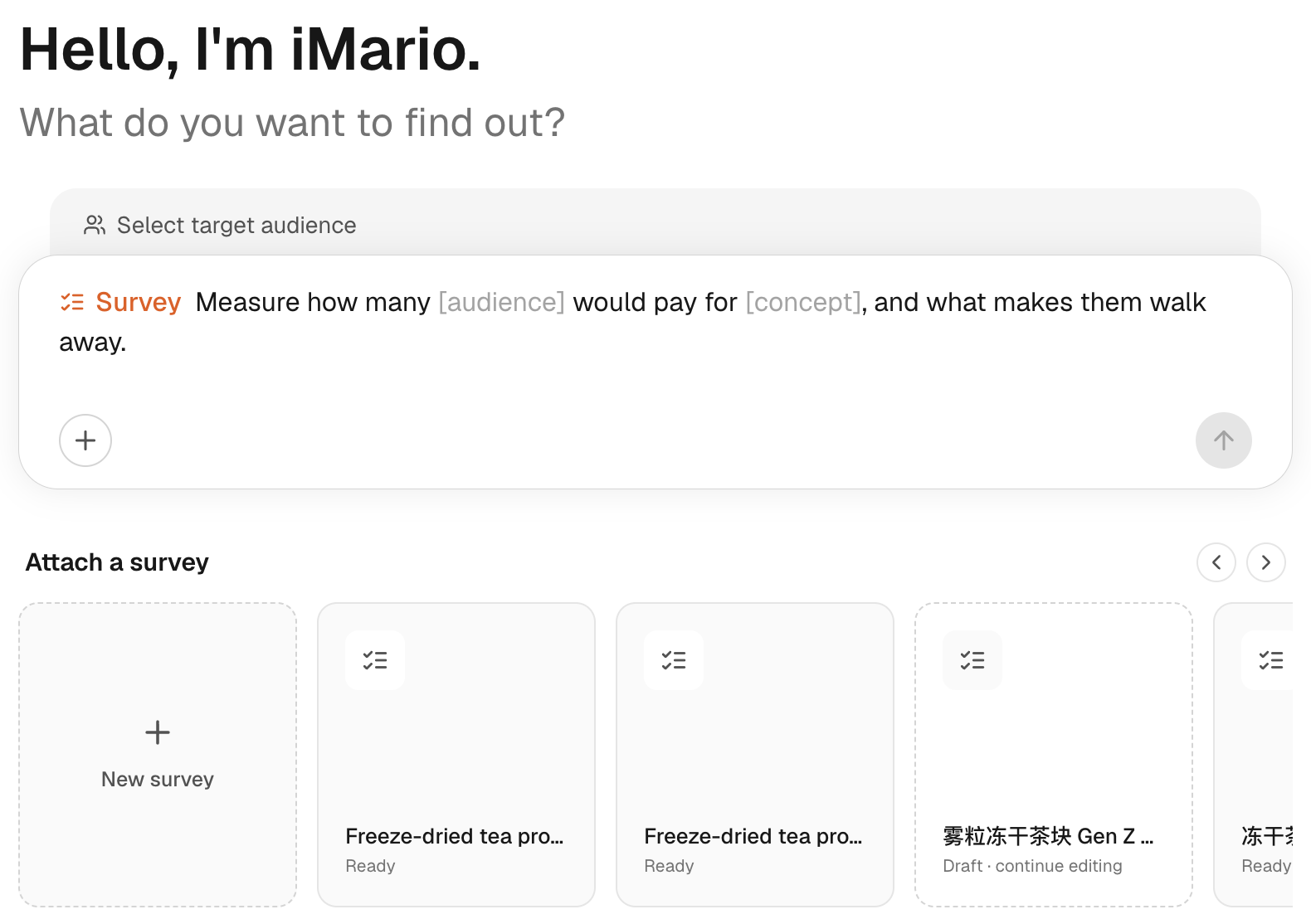
The goal says what you want to learn; the attached questionnaire contains what respondents actually answer.
Read the results
- Follow the progress on the survey card. Results appear in the same conversation when the run is complete.
- Read each closed question. Bars show the share of respondents who chose each option (here Q1: 3–6 times a week 38.2%, 1–2 times a week 37.1%).
- Read each multi-select question. Shares can add up to more than 100%, because respondents could choose more than one option (here Q8: Too expensive 66.5%).
- Read the open question. Answers are grouped into WHY themes, each with the share of respondents who raised it (here Q9: Fresh Taste / High Brew Fidelity 71%).
To see who chose an answer, click its bar in the result to open Explorer, then compare groups there. Check overlapping respondents before you interpret a pattern across questions.
Cost and next steps
The estimate depends on question type, options, ranking items and respondent count. Review Pricing & credits and the displayed estimate before running the survey.
Single-choice and open questions are charged per respondent, open questions at a higher rate. Multi-select questions are charged per option and rankings per item. See the current rates and worked examples in Pricing & credits.
If what you attach is not a questionnaire, such as a press release or a product description, iMario says what it looks like, suggests the task that fits, and runs it as attached only if you confirm. A survey runs as a survey and a discussion guide as interviews.