

Connect the iMario MCP Server
Approve a connection or create a workspace key, configure a client and verify access before running research.
Before you start
The server address is https://mcp.imario.ai/mcp. Settings > MCP & API shows it with a copy button.
Your client must support Streamable HTTP. There are two ways to authenticate, and which one you use depends on the client, not on your account:
- Approve the connection. ChatGPT, the Claude apps, Claude Code, Codex, Cursor and VS Code send you to iMario, where you sign in, choose a workspace and approve. Nothing to copy.
- Use the API key. Code that can't open a browser, such as a scheduled job, CI or your own agent, uses the workspace's API key from Settings > MCP & API.
Either way the connection acts as the person who created it, inside one workspace. Workspace membership and role still apply, and it stops authenticating if it is revoked or if its holder leaves the workspace. Read access does not let a viewer run research.
Neither carries a budget. What connected apps may spend is one daily ceiling for the whole workspace, set under Daily limit in Settings > MCP & API. Each connected app, and the API key, shows what it has spent in the last 30 days.
In Claude Code, Codex or Cursor you can hand the whole setup to the agent: paste Connect iMario to this agent: imario.ai/SKILL.md. The agent runs the commands in step 2 and installs the companion skill; step 1a, the approval, stays yours.
1a. Approve a connection (ChatGPT, Claude, Claude Code, Codex, VS Code)
- In the app, add a connector and give it the endpoint above. In Claude Code or Codex, run the command in step 2.
- The app discovers where to authorize and identifies itself, either by registering or by pointing at its own client metadata document. You are sent to iMario.
- Sign in if you are not already, then choose the workspace this app may reach and select Approve.
- You return to the app, connected.
Where the connector is added in the two chat apps:
| App | Clicks |
|---|---|
| ChatGPT | Settings > Security and login, turn on Developer mode. Then Settings > Plugins, select +, name it iMario, enter https://mcp.imario.ai/mcp as the server URL and select Create. Approve the connection in the browser when asked. |
| claude.ai and the Claude desktop app | Customize > Connectors, select +, then Add custom connector, enter https://mcp.imario.ai/mcp and select Add. On Team and Enterprise an Owner adds it under Organization settings > Connectors > Add > Custom > Web, then each member selects Connect under Customize > Connectors. Turn it on in a chat with + > Connectors. |
Pasting Connect iMario to this agent: imario.ai/SKILL.md into these two apps does not add the connector: they read the page and answer, they do not act on it. The line is for Claude Code, Codex and Cursor. A general MCP client that supports Streamable HTTP can use the endpoint and API-key flow below, or its own OAuth approval surface if it supports browser authorization.
The connection appears in Settings > MCP & API under the app's name. Select the bin icon there to disconnect it; the app stops reaching the workspace on its next request and has to be approved again.
1b. Generate an API key
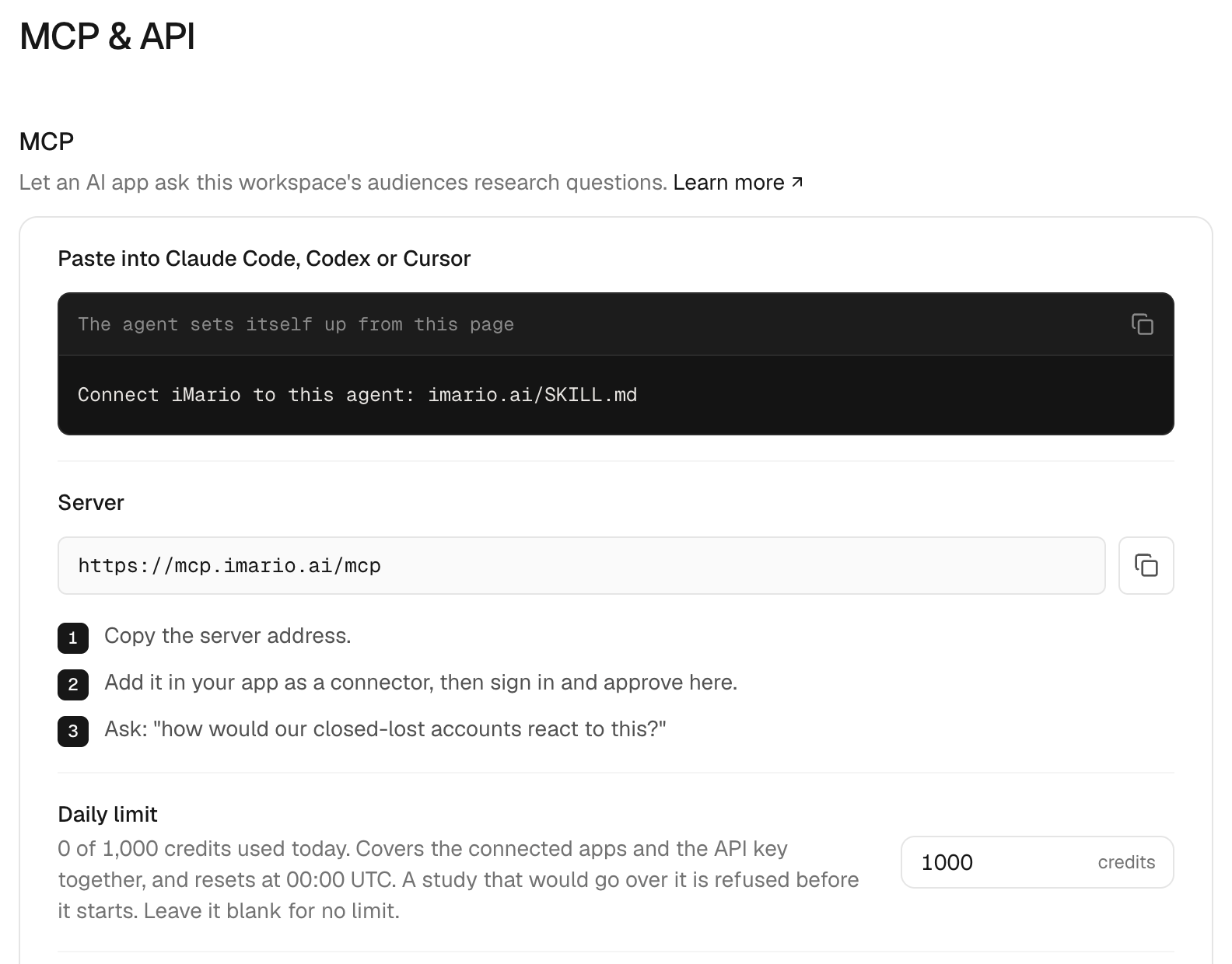
- Open the workspace, then Settings > MCP & API.
- As an owner or admin, select Generate key under API keys.
- Copy the key while it is on screen. It is shown once; afterwards the page shows only its first characters.
A workspace has one API key. Regenerate replaces it: the old key stops working on its next request, and the new one works at once. Anything that used the old key needs the new one.
Store the key in your client's local configuration or credential facility. Do not put a real key in a committed project file or a chat message.
2. Configure the client
Claude Code
claude mcp add --transport http imario YOUR_MCP_ENDPOINTThen run /mcp in Claude Code, select imario and choose Authenticate. Your browser opens on the approval page from step 1a. See Claude Code's MCP instructions for configuration scope and removal.
Codex
codex mcp add imario --url YOUR_MCP_ENDPOINT
codex mcp login imario
The second command opens the approval page in your browser. See the Codex MCP instructions.
claude mcp add and codex mcp add register a remote server; neither installs a local iMario process. Apps you connect in their own settings, such as ChatGPT and claude.ai, need no configuration: step 1a is the whole setup.
VS Code
Use the MCP server configuration surface provided by your VS Code installation. Add a server named imario with the Streamable HTTP endpoint, then choose the browser approval flow if the client offers it. If the client asks for a key instead, use Authorization: Bearer YOUR_IMARIO_KEY and keep the key in the client credential store.
Another MCP client
For a general MCP client, add https://mcp.imario.ai/mcp as a Streamable HTTP server named imario. Complete its OAuth approval if available; otherwise configure the workspace API key as an authorization header. Then list tools and audiences before estimating or running research.
With a key
Configure a server named imario, use the deployment's URL, select Streamable HTTP and add Authorization: Bearer YOUR_IMARIO_KEY. The service also accepts X-Imario-Key. Client-specific configuration file schemas differ: do not copy one client's JSON into another client's settings unchanged.
Claude Code takes a key too, if you would rather not sign in:
claude mcp add --transport http imario YOUR_MCP_ENDPOINT --header "Authorization: Bearer YOUR_IMARIO_KEY"Send your own images and questionnaires
A creative test shows respondents the actual picture. iMario first uses an attachment supplied by your app, then an automatic upload if the assistant can read the file. You only need to choose the image again when neither route is available or the automatic upload fails:
| Where you are | What happens |
|---|---|
| ChatGPT with file input support | The app supplies the attachment to iMario. No second file selection. |
| Codex, Claude Code, or another client with file and network access | The assistant uploads the readable attachment automatically. No manual card opens. |
| A client without automatic transfer, or after an upload failure | The assistant can open an iMario card. Choose the image and select Upload image, or Start study if the card includes your study. |
| A client without cards | The assistant can give you a one-time link to upload the image in your browser. |
Creating an upload link or calculating a study price does not mean the image has arrived. The assistant should confirm an upload only after iMario reports receipt. If a study fails to start after the card uploaded the image, retrying in the card reuses that image.
On claude.ai the assistant can also upload the image from its code execution environment, if that environment is allowed to reach iMario. To allow it, add the iMario API host under Settings > Capabilities > Code execution and file creation > Additional allowed domains. On a Team or Enterprise plan an admin has to add it. Uploaded images are saved to your Library.
A questionnaire or interview guide needs no upload. Give the assistant the document and ask it to run it: it transcribes the questions, and iMario saves them to your Library as a survey or guide. Question text and answer options carry over; skip logic, grids and pictures inside questions do not, and the assistant should tell you so.
A rough sketch of an idea can be tested as a description instead of an image. The results then say that respondents reacted to a description, not to the picture itself.
3. Verify without starting a study
Reconnect the client and inspect its server/tool list. The server exposes list_audiences, create_audience, get_audience, estimate_study, run_study, get_study, request_upload (automatic upload preparation) and request_manual_upload (manual fallback).
Ask the agent: “List the iMario audiences I can access. Do not create an audience or run a study.” Confirm that the returned audience definitions belong to the intended workspace.
Next, ask for an estimate using an audience ID from that list. Inspect cost, available balance, rejected audiences and budget limits before approving a run. A successful connection does not itself authorize research spending.
4. Run and return to the results
When you choose to run, the agent calls run_study and receives run_id, study_id and web_url. Reuse an idempotency key for retries of the same submission. Retrieve progress with get_study; avoid a tight polling loop.
Read outcome before interpreting the result. partial_answers needs the actual completed count; no_answers is not a zero-percent finding. Open web_url to inspect the study. Report generation, and targeting a follow-up only to the respondents who chose one option, are web interface workflows.
Troubleshoot and revoke
| Result | Action |
|---|---|
| Endpoint not found | Check the server address for a typo, and that a self-hosted deployment exposes /mcp |
| HTTP 401 | Approve the connection again (in Claude Code, /mcp > Authenticate), or check the key, its revocation state and its holder's membership |
| HTTP 429 | Slow down all calls on the key; its limit is shared across polling and tools |
audience_rejected | Inspect the reason; do not silently substitute another audience |
daily_budget_exceeded | Reduce the study, wait for 00:00 UTC, or have the owner/admin raise the daily limit in Settings > MCP & API |
insufficient_credits | Check the workspace wallet; a new key does not add credits |
| Tools listed but the skill is absent | Install the companion skill separately |
To rotate the API key, select Regenerate in Settings > MCP & API; the old key stops working on its next request. To end an app's access, select the bin icon next to it under Connected apps; its sign-in stops working on its next request, and it has to be approved again. Neither cancels a study already submitted. Removing the server inside an app does not disconnect it in iMario.