

Build Your TaskSet Up Your Task
Audience
Choose whose perspective matters for this task — a cohort, or a single individual.
The Audience Node is where you decide whose perspective matters for this task.
The same content tested with two different audiences can produce completely different findings — not because the content changed, but because the people did. Choosing the wrong audience doesn't just produce unhelpful results; it can actively mislead you.
To configure your Audience Node:
- Click Audience #1 on the Task Canvas to open the configuration panel
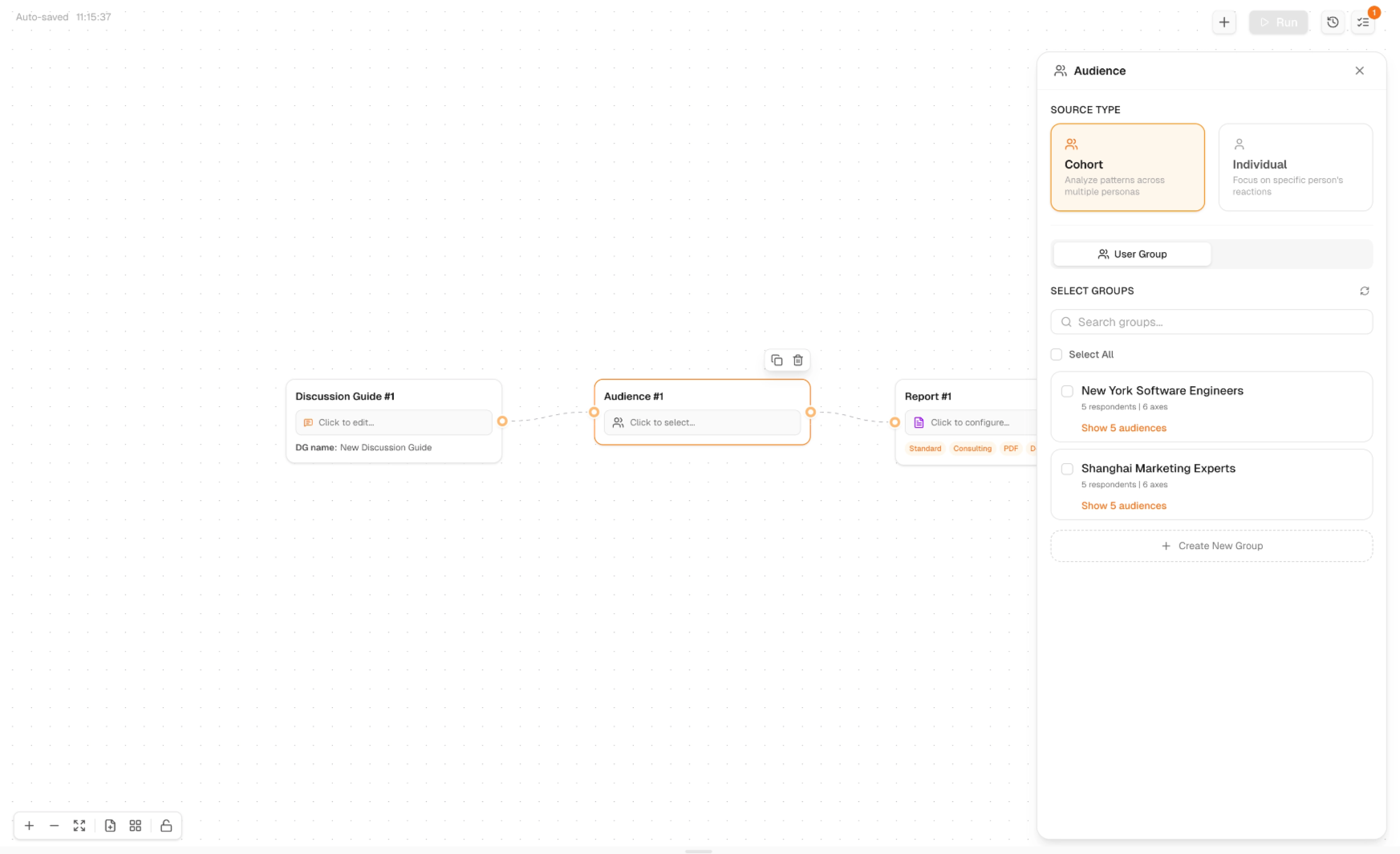
- Select a Source Type:
- Cohort — analyze patterns across multiple personas. Use this when you want to understand how a segment thinks or surface patterns across perspectives
- Individual — focus on a specific person's reactions. Use this when depth matters more than breadth — a specific buyer type, a particular user archetype, or a Solo Mode individual
- Under Select Groups, search for an existing audience or select from your saved groups
- If you haven't created an audience yet, click + Create New Group to build one from scratch
Each saved group shows the number of respondents and axes — use this to gauge whether the audience is sized appropriately for your task before selecting it.